Note: I originally wrote this post for Girls Rock, with whom I like to guide women’s intermediate-ish rides in Santa Cruz. I get a lot of requests for how riders new to the area can repeat the ride, especially in UCSC, where trail finding is cryptic and trails outside of Wilder are unmarked.
One thing I didn’t immediately understand when I started riding is that I can record the rides I go on, especially when a friend is informally guiding or leading me on new trails, and then I will have that recorded route to follow again. How I record and share routes is of course a matter of preference, routine, and also varies with your choice of technology. This is just my way, one among many. I like to record every ride either in Strava on my phone (app and account are free with optional paid upgrade) or, alternatively, on my bike computer so that I can then share or follow that route again.
Recording a Route While You Ride: “Start Your Strava!”
If using my phone, I open the Strava app and hit record at the beginning of the ride and then stash my phone away in my pack. Be sure to let the app run for the entire ride and remember to end/save when you finish. Give the ride a name that will make sense to you later when searching for it (bonus points for a name that will entertain your friends/followers!).
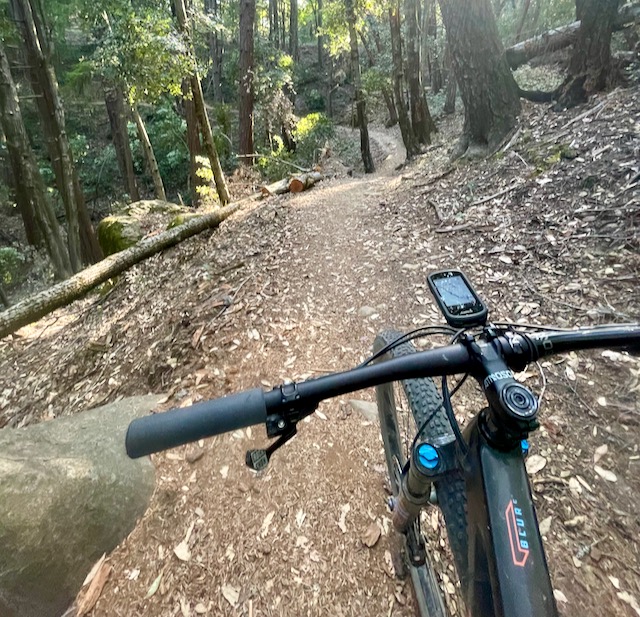
The second way I record rides is directly on my bike computer (not a phone), which is mounted to my handlebar with a K-Edge mount. I have a Garmin Edge 830, I call her “Garmina.” There are lots of other bike computers (like Wahoo and Hammerhead, etc.) and mounts on the market. They all have their pros and cons. Whatever your bike computer, I strongly recommend having a back-up map or riding buddy with you or knowledge of your route so that you are not stuck if your computer malfunctions mid-ride, which can happen and has happened to me more than once where there’s no cell reception.
(I have called Garmina every four-letter word in the book for idiocy on the trail like sending me the wrong way, failing to calculate an uploaded route, telling me to make a U-turn when there is clearly only one way to go and I know I’m going the correct way, alerting me to make a turn long after I’ve gone down a steep hill that I then have to re-climb to get on the correct path, etcetera. But it works more often than it doesn’t, and when that ceases to be the case, I will shell out for a different computer. In the meantime, I always have a backup navigational method, like Trailforks, if I’m following a route on a Garmin.)
Following a Recorded Route
If you record routes directly on your bike computer, you should be able to find them in your activity files, like Garmin Connect, to repeat pretty easily. Your work is done here. Go have fun in the woods!
However, if you record a route on your phone using Strava, or if you want to follow a Strava route that a fellow rider shared with you, you may have some additional steps to repeating that route.
After recording a route on Strava, you can find the route you recorded in your profile under Activities. On your phone, go to the Activity and click on Save Route. This will add the route to a collection of your Strava routes that you can follow later using the same app. You can even edit the route to start/end from a different location (let’s say you park elsewhere); this may be a subscription-only feature.
If I forget to record a ride or want to do someone else’s route, I just ask a fellow rider to share their route with me, and they usually send me a link to their route in Strava. Important: routes marked as private cannot be shared on the app but can be shared from the website. When I receive the route, I can save it to My Routes.
However, I personally find it impractical to follow mountain biking routes on my phone because you have to consult the phone at every intersection, which is annoying and takes forever. And where do you put your phone for easy access? I won’t attach my phone to my trail bike handlebars or keep it in my shorts pocket because a crash will break it (or me). I also wouldn’t recommend stuffing a phone in your sports bra for safety reasons we can all imagine. There’s a better way!
Getting a Route File from the Web onto a Bike Computer
I prefer following trail routes turn-by-turn on my bike computer that sits on the “dash” of my handlebars. Unlike my phone, it is small and designed to withstand a certain amount of abuse, which I can confirm from experience! I have the same bike computer mount on each of my bikes to record/follow routes and protect my phone from accidents on the road and trails. It is another gadget to buy and manage, but I can’t imagine exploring/riding without it.
Find and follow directions to sync your Strava to your bike computer. If you have a Garmin, for example, here’s how to sync your Strava to your Garmin, so that if you “star” (aka “favorite”) a route in Strava, it then shows up as a route listed on your bike computer. This has been hit-or-miss for me in the past. While the hits are sweet, the misses can ruin a ride! So don’t leave the house without checking to ensure your route has fully loaded on the bike computer. If Strava-Garmin auto-sync doesn’t work for you, I set aside time before leaving home to add the route manually to my Garmin. This process may vary by type of bike computer – here’s how I do it for my Garmin:
- I connect my Garmin to my laptop via the charging cable (this also gives you time to charge the device).
- On Strava, I find the route and Export GPX or TCX, which downloads the map file onto my laptop. Some bike computers prefer one type of file over the other.
- I open my laptop Finder (file manager) and copy the downloaded file.
- I then find the Garmin drive on my laptop, which I can see when Garmina is hard connected by cable, and navigate to the New Files subfolder.
- Paste the GPX or TCX file in New Files
- Eject Garmin and then disconnect the device from laptop
- Important final step: before you leave to ride, check on the bike computer you just disconnected that you can see the route map.
You should now be all set to follow a trail route turn-by-turn on your bike computer!
 Mountain Lady Views
Leave a comment